Showing posts with label online apps. Show all posts

Sunday, October 9, 2011

QR Code Greeting Cards Become the New "Mix Tapes" and Send You to Spotify Playlists.


above: A series of greetings cards that when scanned with a QR code reader direct people to themed music playlists within their Spotify Premium smart phone app.

Once upon a time, the "mix tape" was an overture of intimacy, of sharing, a gesture to show you cared by sending someone your own personal musical playlist as a message. Now, Stupid, a collective of young creatives in the UK, have designed greeting cards with customized artful versions of QR codes (they call them QR Images) that when scanned, lead you to specific playlists on Spotify, making them the mix tapes of the new Millenium.

How it works:


The Cards:

above: Music for art lovers

above left: Music for Cooks; above right: Music for Monsters

above left: Music for Geeks; above right: Music for Love

Stupid is presently in talk with various UK companies about producing the cards en masse, but for now, if you'd like one contact them directly here.

About Stupid:
A collective of young creatives who want to work on interesting and challenging projects. With their mix of creative disciplines they hope to do most projects entirely in house allowing them control over the entire creative process. However when they do use outside specialist talent they make sure it's someone very special with an inherent ability to think stupid.


WTF are QR Codes and what is Spotify?
If you're not at all familiar with QR Codes or Spotify, and the above post sounded like a foreign language to you, learn about both at the links below:

• How QR Codes work
• About Spotify

Friday, September 30, 2011

Turn Your Facebook Activity into a Book of Infographics with Social Memories.


Social Memories is a Facebook app (and 2011 Red Dot Design Winner) from Deutsche Post DHL and Cosalux that allows you to create a 28 page glossy bound hardcover book of your Facebook social activity. The super easy application creates your custom book in minutes.


You choose the date range from which you want them to pull the statistics. Pick from 3 choices of color schemes and your choice from 5 languages and voila! After a few seconds, your activity is analyzed and then organized into tastefully designed infographics available to view online or to purchase.


In a matter of moments I learned that I have more male friends than female friends (amongst those who listed their gender), the majority of my friends (who chose to share their birthdates) are Capricorns, I post about 7 times more photos than I do updates and I'm most socially active on Fridays. And more useless but fun and enlightening facts.

Here's some screen grabs of a sample book from my own facebook activity:


A video of the concept and product:


Price: 19€ plus worldwide shipping


Create yours now here

Thursday, April 7, 2011

A Talented Mom Designs An iPad App. Drum Roll Please....


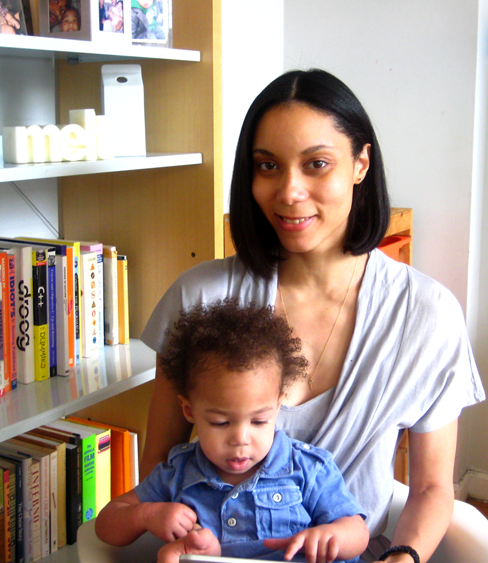
Imani Powell-Razat, a designer/illustrator by trade (see Spye Design Studio) is also a mom who has designed and created an entertaining and informative application for the iPad that is a multicultural celebration of the world's drums.


above: Imani Powell-Razat of Spye Design and her son, Orion, playing with his iPad


Drum Circle Kids is a colorfully animated app that allows your child to engage in and create unique jam sessions by tapping five colorfully animated drummers that represent various types of drums found throughout the world.


The American Trap Set, Caribbean Steel Pan, Chinese Drum, Cuban Conga and the West African Djembe (with more drums to come) can be easily turned on and off with the tap of a finger and combined for dozens of possible musical and sound combinations.


Adding to the fun, is the possibility of discovering ambient sounds hidden in the scenery.


In the learn section, kids can swipe from one drum to the next and touch to play each drum while learning fun drum facts.


Intended for toddlers, age 18 month +
Buy it in the itunes store here

Thursday, February 24, 2011

Echoism, Your Left Side Vs. Your Right Side.


Above: one of the subjects in Wolkenstein's photography study of facial asymmetry

Do you have a good side? Most people do. Rarely are faces symmetrical and more often than not, features are misaligned and various facial characteristics make one side of your face appear very different from the other.


I first introduced you to the work of Julian Wolkenstein three years ago. Echoism, a recent project of his, plays with the notion of your own identity as expressed through your features. What do you look like? What are the things that make you look like you? If you are made symmetrical, do you consider yourself more beautiful, less so, or is it just weird? Or is it you at all? Do you have a best side? What is to be said of left and right brain dominance?


The process is a face-to-camera portrait, after which the image is split into a left and a right section, then one side is horizontally flipped and placed against that same side to make up two separate portraits of the right side and left side of a human face.

In photographer Julian Wolkenstein's initial project, the subjects were specifically cast for their individual facial features. They were photographed front to camera and in the same position. They were asked not to express emotions or character.

Below are images from the study:


Echoism is now available for you to try via an online website or with an app you can buy in the itunes app store. If you've got a built in camera on your computer, you can visit the website, have your image immediately taken and upload it to the site.

Echoism.org is a project by artist and photographer Julian Wolkenstein.
via Trendland via Notcot

Monday, June 2, 2008

So Many Links, So Little Time: Tools To Get Back To Those "Must Reads"


If you're at all like me, you have literally thousands of items bookmarked and not enough hours in the day to read all the info that's lurking out there in cyberspace. Your RSS feeds are overwhelming, google alerts never cease and you keep swearing that you'll get to that article before your mailbox alerts you that it's at full capacity.

So, what to do?
Read, Write, Web has a nice list of apps that help you 'get back' to those articles of interest. Here they are with links and pertinent info:

6 Great Tools to Save Links for Later

1. ReadBag

ReadBag is a quick and easy bookmarklet to save links for later. ReadBag requires a Google Account to use the service, though OpenID might have been a better choice. The UI is simple and clean with all the features available from the homepage. You can archive bookmarks after you're done reading them, star them, add a note, or simply delete them. ReadBag includes a host of goodies such importing options, a Firefox extension, Google Reader integration, Google Gears support, RSS for your bookmarks, and a mobile interface for both regular phones and the iPhone. Unfortunately, ReadBag doesn't support tagging.

2. Instapaper

Instapaper is a really simple "bookmark it for later" service. With only a simple bookmarklet to bookmark items, Instapaper doesn't offer nearly as much as its competitors. You can edit the title and url of your bookmarks, grab an RSS feed, and add a note to your links. There is one great feature that's available when you click the 'text' link at the end of each bookmark. Instapaper allows you to read your bookmark right from the site with no hassles. All in all, the service is very straightforward with a clean UI and zero distractions.

3. LaterLoop

A new tool from the maker of social bookmarking service Mento, LaterLoop offers the best features out of the group. There's a neat extension for Firefox that features keyboard shortcuts, mobile support, import and sharing options with Del.icio.us, Twitter, Facebook, Digg, and more. Offline support is integrated with Scrapbook Firefox extension instead of Google Gears. You can also read a text only version of your links. However, the UI for text only reminds me of the horrible reformatting job that Google does for mobile phones. Overall, LaterLoop sports a clean and uncluttered UI just like the rest of the pack.

4. LinkRiver

We've reviewed LinkRiver as a great service to find more news on a slow day. Well, when the pace picks up and you find yourself not having enough time, LinkRiver offers a handy bookmarklet to save items for later. If you're a user of the site, you can also bookmark content for later directly from your profile.

5. FriendFeed: Read Later

Fans of the FriendFeed aggregation service will love using the Read Later Greasemonkey script. This script allows you to save entries in FriendFeed for later. It's a very useful tool for reading FriendFeed quickly and coming back to the articles that might get buried under the constant stream of activity. Once installed, you'll begin seeing 'Later' appended to the end of each item. There's also a convenient tab that the script adds to FriendFeed for browsing through your saves.

6. Star it in Google Reader

If you're using Google Reader to go through the never-ending process of reading feeds, Google's 'Star' feature can be a great way to save items for later. To quickly process your feeds, change your display to 'List View' in Google Reader. Then star only the headlines that jump out at you. 'Mark all as read' and repeat until all your feeds have been processed. Now you won't have so many feeds to read and a lot more time to weed through only what might be interesting whenever you have time.

So, you may not get to it today, but at least you can get back to it when you have the (sigh) time.